Understanding IOPS: the technical foundation of cloud storage performance
By Noa Omer on
Last updated on
A while ago, we explored storage tiers and their use cases, examining how splitting storage based on workload requirements can deliver better performance whilst reducing costs. In this blog, we'll take a technical dive into what drives these performance differences, both conceptually and in practical implementation.

What are IOPS and why do they matter?
The core concept to understand is Input/Output Operations Per Second (IOPS), a performance measurement used to describe the speed at which a storage system can process read and write operations. It defines how many individual I/O requests can be completed per second and serves as a key indicator of storage responsiveness.
IOPS measurements are often used when comparing different storage backends such as SSD, HDD, and networked storage systems. A higher IOPS value generally reflects faster access to data, but the metric should be interpreted in combination with latency and throughput to form a complete performance overview.
To make that clearer, let’s talk about IOPS vs. throughput vs latency.
IOPS is about the number of concurrent requests possible to the storage device, imagine a highway. IOPS is the amount of lanes accessible, allowing many cars (requests) to enter and exit quickly.
Throughput is the actual width of both the lanes and highways those requests (cars) are using. Generally expressed in MB/s.
Latency is the amount of time until the car (your request) can get onto the road to make its trip to your storage device.
All three are important: for an application that makes many small, quick requests, high IOPS is essential; for tasks like transferring large video files, high throughput is more important and for few requests with small footprints that need to be served ASAP, latency is more important. These factors have an impact when your application accesses directly attached storage, when a request comes into your application and when a request is made to the browser accessing the application from a user.
Keep in mind that network performance is another matter entirely but you can have perfect network performance in speed and latency and still have your application suffer from bad latency, throughput and IOPS due to the storage it needs to access.
Explore our Object StorageFactors that influence IOPS performance
The effective IOPS value of a system depends on multiple factors:
The underlying hardware architecture
The block size of operations
Queue depth configurations
The type of workload (random or sequential)
A critical point to understand: Allocating more IOPS doesn't automatically guarantee better performance for your specific use case. Generally, it results in improved performance, but the context of a specific application and environment can result in no performance gains in actual application use.
How IOPS scaling works on cloud platforms
The second concept to understand is that on cloud platforms such as Cyso Cloud, IOPS generally scale within a volume or bucket based on how much storage is requested. Usually, a minimum is also available, with tiers that require a high minimum volume or object storage size.
This can make benchmark results from one scenario to another differ purely based on the size of the volume being tested. Benchmarking IOPS on cloud service storage can be tricky, which is why we've created a dedicated guide to help you test accurately.
Cyso Cloud storage tiers: technical specifications
Cyso Cloud currently offers scaling IOPS and tiers with this scaling for our volume storage service. There are also plans to add this to our Object Storage 2.0 further down the line.
Volume storage IOPS scaling
For volume storage, the scaling works as follows:
Tier 1 storage: 5 IOPS per GB
Tier 2 storage: 25 IOPS per GB
Both tiers cap out at roughly 25,000 IOPS:
Tier 1 requires a 5TB volume to reach this cap
Tier 2 requires a 1TB volume to reach this cap
Tier 2 scales faster in performance (and is thus somewhat pricier). For a 100GB volume, the difference looks like the examples given below.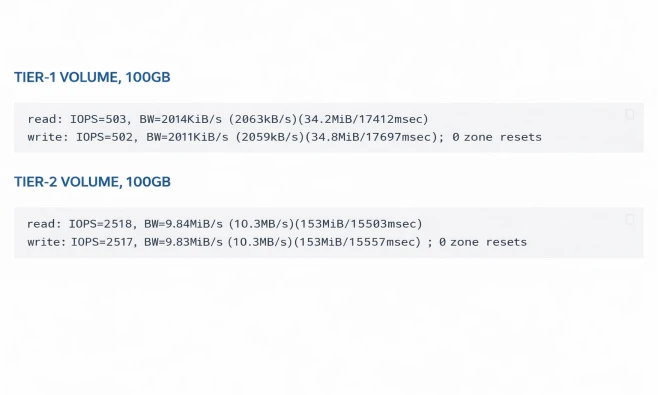
(this is single threaded performance, details here)
Transparent pricing within the platform
This difference in scaling is also shown when creating volume storage within the Cyso Cloud interface. No Azure Pricing Calculator needed as it fits seamlessly right into the creation process, giving you full visibility into what you're getting before you commit.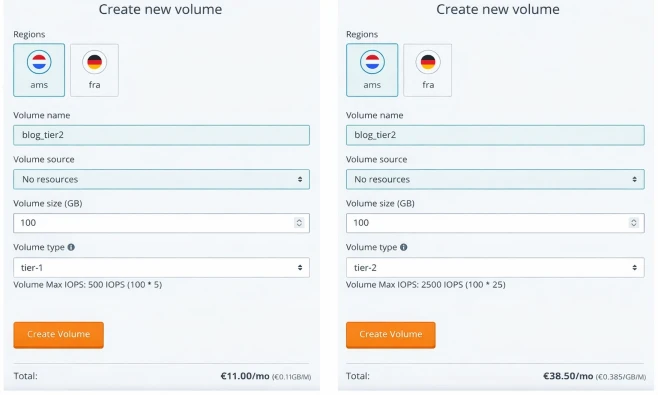
Selecting the right storage tier for your workload
Selecting the right tier of storage depends on both the scale of storage you're expecting to use and the use case it's attached to. More details on specific use cases can be found in our storage tiers guide.
When higher IOPS won't help
If your application is being bottlenecked by:
Available memory
CPU clock speed
Network bandwidth
...then a faster storage tier won't help. The same applies in reverse for each of those variables that determine end performance.
Visibility into and knowledge of your own application's bottlenecks and scaling factors is crucial. If you do have good insight into how you're scaling, volume tiers let you get more value from your infrastructure spend, as the American hyperscalers would put it.
Get started with optimised storage
Understanding IOPS and how storage tiers scale on cloud platforms gives you the technical foundation to make informed decisions about your infrastructure. At Cyso Cloud, we've designed our storage tiers to be transparent, flexible, and optimised for European data sovereignty requirements.
Need help determining the right storage configuration for your workload? Our technical team is ready to assist.
Get in touch