EMK - Dual approval cluster deletion
Estimated time to read: 2 minutes
This page describes how to configure the dual approval cluster deletion for your Kubernetes cluster, either from the dashboard or with a service account.
Dual approval cluster deletion configures your EMK project to require two distinct subjects to complete a cluster deletion: the subject confirming the deletion must not be the same as the subject sending the DELETE request. This helps prevent accidental deletion of clusters.
Danger
Project members and service accounts can still change the labels of a cluster (or the selector itself) to circumvent the dual approval concept. This is intentionally out of scope; this feature is not a "security feature", but a safeguard against accidental deletion.
Configure dual approval cluster deletion
Navigate to the Team overview in the Cyso Cloud dashboard.
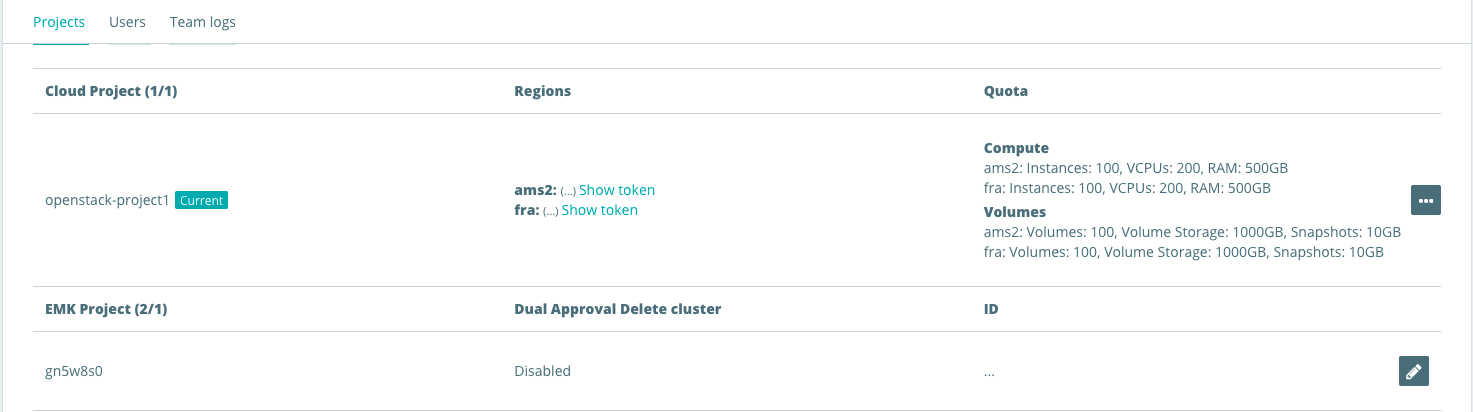
Here you can find an overview of your cloud / EMK projects. To enable dual approval:
- Click the edit (pencil) icon next to the project.
- Toggle the Dual approval option.
- Click Save to apply the change.
Make sure you have a service account and can access your EMK project with it. See service account access.
Update your EMK project to contain:
spec:
  dualApprovalForDeletion:
  - resource: shoots
    selector:
      matchLabels: {}
    includeServiceAccounts: true
The selector.matchLabels field controls which clusters are in scope:
matchLabels: {}— matches all clusters in the project.matchLabels: null— matches none (effectively disables the rule).- A specific label selector can be used to exclude certain clusters, for example to allow CI or development clusters to be deleted freely.
The includeServiceAccounts field (default: true) controls whether the dual approval requirement also applies to ServiceAccount-triggered deletions. Set to false if CI jobs should be exempt from the dual approval flow. Alternatively, two separate service accounts can be used. One to confirm deletion and one to send the DELETE request.
Verify the configuration
After applying the change, confirm the setting is active by inspecting the project spec:
kubectl get project my-project -o jsonpath='{.spec.dualApprovalForDeletion}'
[{"includeServiceAccounts":true,"resource":"shoots","selector":{}}]
Disable dual approval
To disable dual approval, remove the dualApprovalForDeletion key from the project spec entirely, or set the selector to null: