EMK - Reconcile a Kubernetes cluster
Estimated time to read: 3 minutes
In this tutorial you learn how to trigger a reconciliation of your Kubernetes cluster through the GUI, kubectl or Terraform.
Reconciliation is the process where EMK ensures that the actual state of your cluster matches the desired state defined in the Shoot specification. This process can be useful when:
- You want to apply configuration changes immediately
- You need to roll out updates to custom policies (OIDC configuration, etc.)
- You want to force a refresh of cluster components
- Troubleshooting cluster issues
Automatic Reconciliation
EMK automatically reconciles clusters periodically (typically every 24 hours). Manual reconciliation is only needed when you want to apply changes immediately or troubleshoot specific issues.
Reconcile a cluster
Reconciling an EMK Cluster is straightforward.
Navigate to the EMK Cluster overview in the Cyso Cloud dashboard
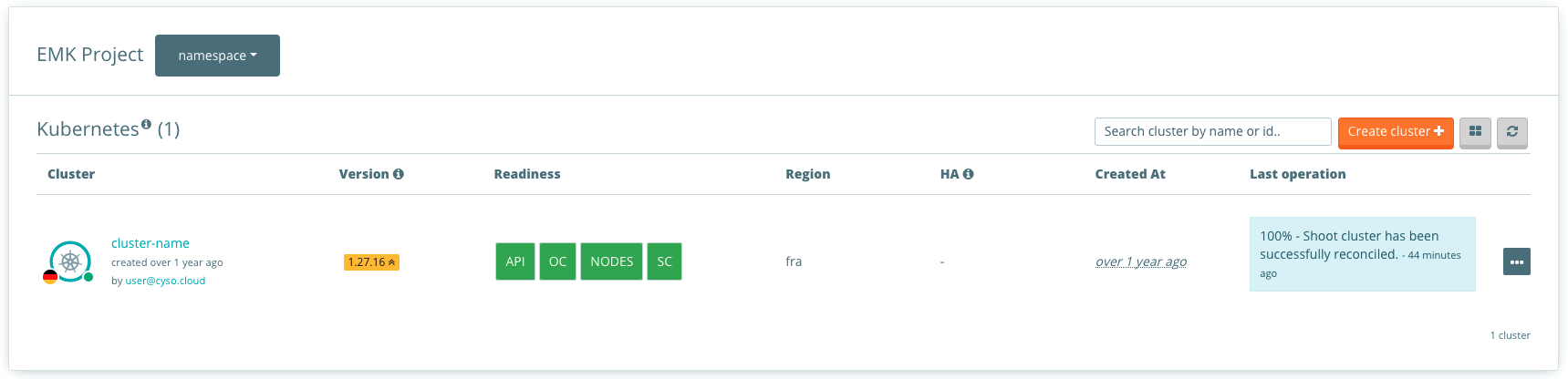
Here you can find an overview of all your clusters. Click on the three dots "..." and select "Reconcile cluster". A form will pop up with the request if you want to reconcile your cluster. Click on reconcile cluster now.
The reconciliation process will start immediately and you can monitor the progress in the cluster overview.
Requirements:
- Kubectl, installation instructions can be found on kubernetes.io.
- Service Account (SA), see How to access my EMK cluster.
First list your clusters to see their current state:
% kubectl get shoots
NAME         K8S VERSION  HIBERNATION  LAST OPERATION             STATUS      AGE
my-cluster   1.28.9       Awake        Reconcile Succeeded (100%) healthy     42d
To trigger a reconciliation of your cluster with kubectl, use the following command:
% kubectl annotate shoot my-cluster gardener.cloud/operation=reconcile
shoot.core.gardener.cloud/my-cluster annotated
The reconciliation process will start immediately. You can check the status by listing your clusters:
% kubectl get shoots
NAME         K8S VERSION  HIBERNATION  LAST OPERATION             STATUS      AGE
my-cluster   1.28.9       Awake        Reconcile Processing (45%) healthy     42d
Note
The gardener.cloud/operation=reconcile annotation is automatically removed after the reconciliation starts.
Understanding Reconciliation Progress
During the reconciliation process, you can monitor the progress in the cluster overview. The LAST OPERATION column shows the current status:
- Reconcile Processing (X%): The reconciliation is in progress, with X indicating the completion percentage
- Reconcile Succeeded (100%): The reconciliation has completed successfully
- Reconcile Failed: The reconciliation encountered an error
Reconciliation Duration
Reconciliation can take several minutes depending on the size of your cluster and the changes being applied. During this time, the cluster remains operational, but certain management operations may be temporarily unavailable.
Common Use Cases for Manual Reconciliation
Applying Configuration Changes Immediately
When you update configuration like Audit Policies or OIDC settings, EMK won't automatically apply these changes. Use reconciliation to apply them immediately.
Rolling Out Policy Updates
After updating a ConfigMap referenced by your cluster (e.g., custom Audit Policy or Structured Authentication), trigger a reconciliation to apply the changes.
Troubleshooting
If your cluster shows unexpected behavior or is stuck in a pending state, triggering a reconciliation can help resolve the issue by re-syncing the cluster state.
Forcing Component Updates
When EMK releases updates to cluster components, a reconciliation ensures your cluster picks up these updates.